Walmart is one of the largest online marketplaces in the world, with millions of product listings and a constantly changing ecosystem of third-party sellers. For companies that rely on marketplace data, Walmart can be an extremely valuable source of information.
Many consumer brands monitor Walmart listings to detect unauthorized sellers and price violations. If a reseller undercuts the official retail price, brands often want to know about it quickly so they can take action.
E-commerce sellers scrape Walmart to track competitor pricing. By monitoring product listings over time, they can see when competitors change prices, run promotions, or adjust inventory.
Some companies also analyze seller activity on Walmart listings. Tracking things like the number of sellers on a product page, price changes, or Buy Box shifts can reveal how competitive a product category is.
Others use Walmart data for product research, identifying trending items, analyzing category growth, or monitoring how new products perform in the marketplace.
In short, Walmart pages contain a lot of useful data — but it is designed for humans to browse, not for machines to analyze. Web Scraping allows you to collect that information programmatically and turn it into structured data that can power analytics, monitoring tools, and competitive intelligence systems.
SCRAPING WALMART HTML
First attempt: The "Requests" approach
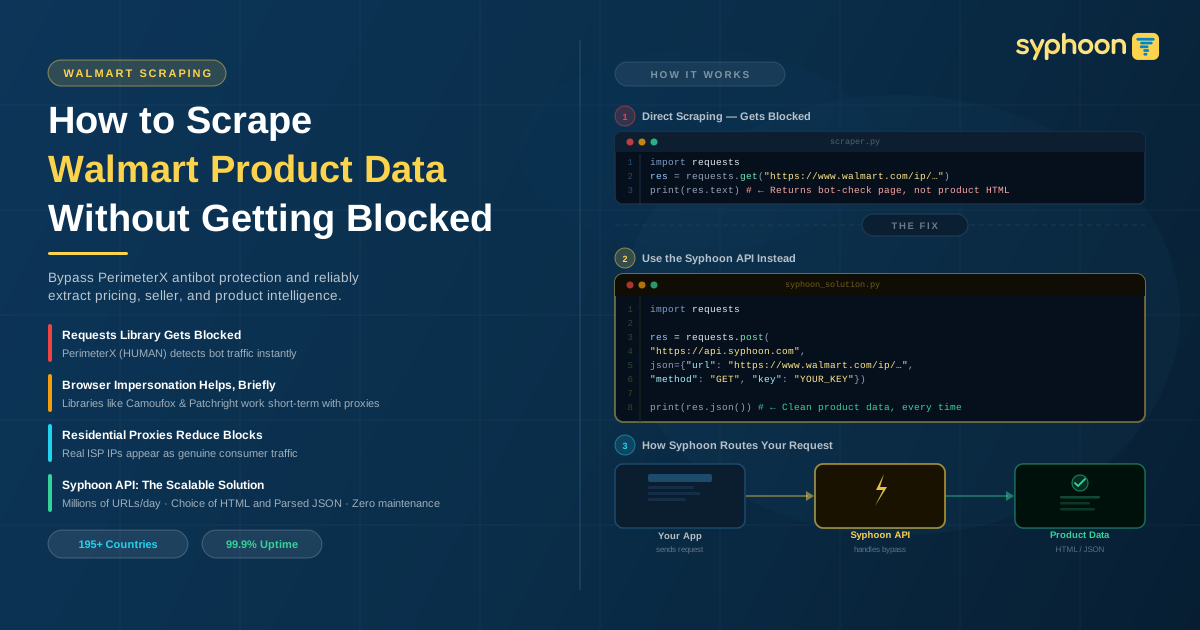
If you are new to the scraping scene, your first instinct might be to use something simple, and nothing is as simple as Python’s requests library.
So you set up your Python environment with your virtual environment manager of choice, be it venv or virtualenv, you install requests and write up your basic “scraper”, which may look like this:
1import requests
2
3res = requests.get("https://www.walmart.com/ip/PlayStation-5-Digital-Console-Slim/17852302051")
4
5print(res.status_code)
6
7print(res.text)
You run it, and see a Status code 200, and you certainly see some HTML, and you think, "Yay, problem solved!", so you modify the code a little bit to dump the HTML into a file to inspect it properly.
1import requests
2
3res = requests.get("https://www.walmart.com/ip/PlayStation-5-Digital-Console-Slim/17852302051")
4
5with open("sampleWalmart.html", 'w') as f:
6    f.write(res.text)
You run it again, you open the saved file in your browser of choice, and your excitement falters. The HTML seems to be a page that is trying to verify if you are human.
insert image here
Well, not daunted by this failure, you keep going, fire up your browser again, open up DevTools, and open the Walmart link while keeping a keen eye on Devtools network tab. You copy the cURL for the request that returns the product HTML, convert it to Python code, and now, your updated code looks more formidable:
1import requests
2
3res = requests.get(
4    "https://www.walmart.com/ip/PlayStation-5-Digital-Console-Slim/17852302051",
5    headers={
6        "accept": "text/html,application/xhtml+xml,application/xml;q=0.9,image/avif,image/webp,image/apng,*/*;q=0.8,application/signed-exchange;v=b3;q=0.7",
7        "accept-language": "en-GB,en;q=0.9",
8        "cache-control": "no-cache",
9        "pragma": "no-cache",
10        "priority": "u=0, i",
11        "sec-ch-ua": '"Not:A-Brand";v="99", "Google Chrome";v="145", "Chromium";v="145"',
12        "sec-ch-ua-mobile": "?0",
13        "sec-ch-ua-platform": '"Linux"',
14        "sec-fetch-dest": "document",
15        "sec-fetch-mode": "navigate",
16        "sec-fetch-site": "none",
17        "sec-fetch-user": "?1",
18        "upgrade-insecure-requests": "1",
19        "user-agent": "Mozilla/5.0 (X11; Linux x86_64) AppleWebKit/537.36 (KHTML, like Gecko) Chrome/145.0.0.0 Safari/537.36",
20    },
21)
22
23with open("sampleWalmart.html", "w") as f:
24    f.write(res.text)
You run this again, and with any luck, it might actually work! But the devil is in the details. You run this for a handful of URLs, and the dreaded "Are you human" page rears its ugly head yet again. So close... yet so far!
Second attempt: The "Impersonation" approach
At this point, you start researching how to mitigate the blocking, and inevitably, you come across multiple HTTP clients that claim to bypass anti-bots by "impersonating" browsers. The topic of "impersonation" is a whole other can of worms that we will love to talk about in the future, but let's stick to the topic at hand - scraping Walmart at scale.
You can try out the cutting-edge HTTP clients out there, and they might work with varying degrees of success, but soon enough, you figure out that your requests fetch the blocked page after a certain number of requests.
Of course, you can add rate limits and tweak the number of requests you send, but your success rate still nosedives after a while.
If you're tenacious, you can try to venture into the new and shiny browser-based libraries, but the end result is still the same.
The problem: Antibot
Walmart uses PerimeterX to protect its site from bot traffic. PerimeterX, now renamed to HUMAN after its merger in 2022, is one of the most popular and effective anti-bots out there.
They are aware of the tricks scrapers use to bypass anti-bots, and regularly update their product to patch any bypass that is exploited by scrapers.
Having Trouble Avoiding Walmart Scraping Blocks?
If the volume of URLs you want to scrape is small, you may get by using a well-maintained browser-based solution, like Camoufox or Patchright (pro-tip: check the date of the latest release on GitHub to understand which one is more updated), but you will still need good residential proxies to ensure your IP doesn't get banned by Walmart.
You can use residential proxies from Syphoon. It will help distribute your requests across real user IP addresses. This makes your traffic appear much closer to normal browser activity, which significantly reduces the chances of getting blocked by Walmart’s antibot systems.
However, this is not a long-term solution, and you will end up having to switch libraries once PerimeterX patches its antibot.
Need a Reliable Way to Scrape Walmart Data at Scale?
The Solution: Syphoon API
Syphoon takes away the pain of hunting for effective libraries and maintaining and updating your own scripts by providing a simple API service specifically designed to scrape Walmart extensively.
It is a robust and scalable service that lets you effectively scrape millions of URLs every day without getting blocked.
The API is also dead easy to use. Your code can now be:
1import requests
2
3res = requests.get(
4    "https://api.syphoon.com",
5    json={
6        "url": "https://www.walmart.com/ip/PlayStation-5-Digital-Console-Slim/17852302051",
7        "method": "GET",
8        "key": "YOUR_SYPHOON_KEY"
9    }
10)
11
12print(res.text)
Sign up now to get your Syphoon key, and you can immediately get started with Walmart scraping.
Please note that Walmart Scraping Solution is one of our specialized offerings, so please reach out to our ever-friendly and helpful customer support to get access to the Walmart solution.
Looking for an Easier Alternative to Scraping Walmart Using Python and Rotating Proxies?
The Added Bonus: Parsing... and maybe extra data
Well, fetching the HTMLs is just half, and honestly, the most difficult half, of the challenge.
The tedious half remains: parsing the HTML to extract data.
You can whip out the old and trusted BeautifulSoup4 and figure out the selectors for the elements you need to parse, or you can use our Walmart Scraping Solution with Parsing that returns parsed data in JSON format instead of HTML.
If you need a customized solution that captures more data than what is already present in the HTML, like the list of all sellers for a particular product, please feel free to reach out to us, and we will be happy to help.
Hope our Walmart Scraping guide was helpful
If you’ve made it this far, thank you for sticking with us. And if you jumped straight to this section, here’s the short version: if you only need to scrape a small number of Walmart pages, maintaining your own scripts with the help of reliable residential proxies can work just fine. However, once your needs scale to larger volumes, managing scripts, bypassing anti-bot protections, and maintaining infrastructure quickly becomes difficult. That’s where Syphoon’s custom Walmart scraping API comes in.
Our service handles large-scale scraping reliably, offers optional parsed JSON data, and can even provide additional custom data points if your use case requires more than what’s available in the HTML.
Scale Your Web Data Collection with Syphoon
Don't let complex bot protections and proxy management slow down your business. Use Syphoon's enterprise-grade infrastructure to extract structured web data at any scale.
FAQs
Join Our Community
Connect with our team, discuss your use case, ask technical questions, and share feedback with a community of people working on similar problems.