

Every product on Amazon has an ASIN: a ten-character identifier that is the key to everything useful about that listing. The price the seller offers, the ratings, the Best Seller Rank, the product specifications, the images. All of it is tied to the ASIN and publicly visible on the product page.
The challenge is not finding the data. The challenge is collecting it at scale, reliably, without building and maintaining infrastructure that fights Amazon's bot detection every day. This article covers what ASIN data contains, what teams use it for, and how Syphoon's Amazon data scraper removes the infrastructure problem.
Need scalable Amazon ASIN data?
What Is an Amazon ASIN?
ASIN stands for Amazon Standard Identification Number. It is the unique identifier Amazon assigns to every product in its catalogue. A ten-character alphanumeric code, it appears in every Amazon product URL: amazon.com/dp/B0DZZWMB2L, where B0DZZWMB2L is the ASIN.
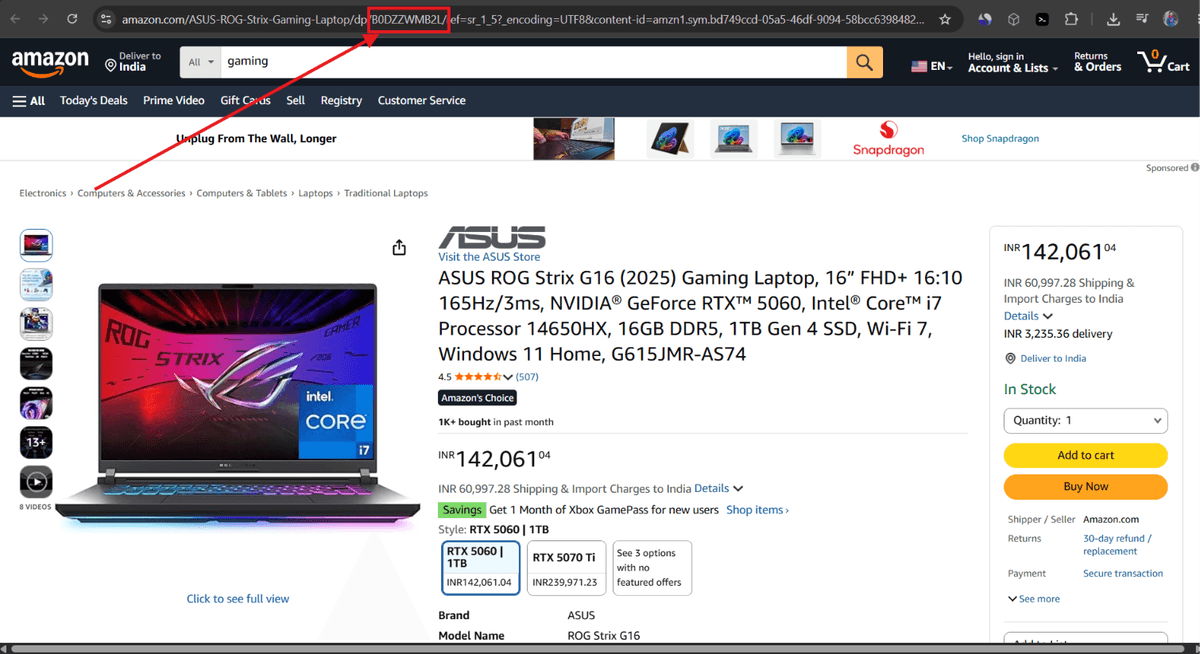
ASIN is also the bridge between Amazon and other platforms. The same product listed on Amazon and Walmart can be matched using the UPC or EAN embedded in the ASIN's product data. This makes ASIN-level data collection the starting point for any cross-marketplace product intelligence programme.
What Data Sits Behind an ASIN
A single ASIN page on Amazon contains more structured product intelligence than most teams realise. Here is what is available from a product detail page request.
| Data field | What it contains | Used for |
|---|---|---|
| Product title | Full product name as listed | Product matching, catalogue enrichment, search analysis |
| ASIN | Amazon's unique product identifier | Cross-referencing, batch collection, catalogue management |
| Price | Current listed price | Competitor pricing, repricing decisions, price monitoring |
| Original price | Pre-discount price where applicable | Discount validation, promotional tracking |
| Discount | Amount or percentage reduction | Promotion depth analysis, competitor promotional patterns |
| Buy Box seller | The seller winning the Buy Box and their price | Buy Box monitoring, seller competition analysis |
| All seller offers | Every seller's price and availability for the ASIN | MAP compliance, grey market detection, seller tracking |
| Availability | In stock, limited, or out of stock | Stockout monitoring, competitive opportunity detection |
| Best Seller Rank | Rank in primary and subcategory | Sales momentum tracking, category analysis |
| Rating | Average star rating from buyers | Product quality benchmarking, listing optimisation |
| Review count | Total number of customer reviews | Review velocity tracking, market maturity assessment |
| Brand | The brand name | Brand monitoring, authorised seller verification |
| Category | Product category and subcategory path | Category mapping, assortment analysis |
| Images | Product image URLs | Visual catalogue enrichment, content auditing |
| Product specifications | Technical attributes and specifications | Product matching, comparison databases |
Need to scrape Amazon ASIN data?
The Problem With Building Your Own Amazon ASIN Scraper
The data above is publicly visible on every Amazon product page. Getting it programmatically is where the problems start.
Amazon blocks scrapers aggressively
Amazon's infrastructure is designed to detect and block automated requests. Plain HTTP scrapers return empty pages because prices load through JavaScript after the initial response. Add a headless browser and Amazon's fingerprinting detects the session. Add proxies and the proxy pool gets flagged if it is not managed carefully. Each layer of the solution adds setup time, cost, and something else that can break.
Batch collection compounds the problem
Scraping one ASIN is manageable. Scraping 10,000 ASINs daily is a different engineering problem. Request concurrency limits, rate limiting, retry logic, failed request handling, and output validation all need to be built and maintained. At scale, a custom Amazon data scraper becomes a product in its own right, requiring dedicated engineering time to keep running.
Amazon updates break scrapers without warning
When Amazon updates its page structure, selectors break silently. The scraper keeps running, returns no data or malformed data, and the problem only becomes visible when a downstream system stops working. Diagnosing the breakage and rebuilding the selectors is unplanned work that happens on Amazon's schedule.
Location adds another layer
Amazon displays different prices and availability depending on the buyer's delivery location. A scraper running from a single server location returns data for that geography only. For teams monitoring multiple regional markets, this requires separate proxy configurations per region, adding further complexity.
How Syphoon's Amazon ASIN Scraper Works
Syphoon's Amazon Scraper API handles the collection layer. JavaScript rendering, proxy rotation, CAPTCHA resolution, and parser maintenance are managed on the infrastructure side. You send a POST request with the ASIN URL and your API key. You get back structured JSON containing all the fields listed above.
Single ASIN request
1import requests
2
3payload = {
4    "url": "https://www.amazon.com/dp/B0DZZWMB2L",
5    "key": "YOUR_SYPHOON_KEY",
6    "method": "GET"
7}
8response = requests.post("https://api.syphoon.com", json=payload)
9if response.status_code == 200:
10    data = response.json()
11    # Full ASIN data returned as structured JSON
Batch ASIN collection
For collecting data across a list of ASINs, run the same request in a loop across your ASIN list. Each request returns the complete data for that product. Store each response with the ASIN and timestamp to build a price and availability history over time.
1import requests
2
3asins = ['B0DZZWMB2L', 'B08N5WRWNW', 'B09G9HD6PD']
4
5for asin in asins:
6    payload = {
7        "url": f"https://www.amazon.com/dp/{asin}",
8        "key": "YOUR_SYPHOON_KEY",
9        "method": "GET"
10    }
11    response = requests.post("https://api.syphoon.com", json=payload)
12    if response.status_code == 200:
13        store(asin, response.json())
For high-volume needs, review the rate limits on our pricing page to optimize your batch collection strategy.
Location-specific data
Pass a ZIP code or country parameter to receive ASIN data as Amazon shows it to a buyer at that location. Prices, Buy Box winners, and availability can all vary by region.
What Teams Build With Amazon ASIN Data
Competitor product monitoring
Daily ASIN-level collection builds a time-series record of competitor pricing, discount activity, availability, and BSR movement. Teams use this to identify when competitors drop prices, run promotions, or go out of stock on specific products. Out-of-stock events on a competitor ASIN are a signal to increase advertising spend or adjust pricing while the competitor is absent. To understand more about tracking price fluctuations, you can read our guide on the Amazon Price Scraper.
MAP compliance programmes
The seller offers field returns every seller's price for an ASIN. Daily comparison against the MAP threshold catches violations with the seller name, price, and timestamp as documented evidence. Running this across a full product catalogue identifies which ASINs have the most persistent compliance problems and which sellers are the repeat offenders.
Product catalogue enrichment
For teams building product databases, comparison tools, or recommendation engines, ASIN-level data provides the structured product attributes that power these systems: title, brand, category, specifications, images, and pricing. Collecting this at scale from Amazon product pages via the API is significantly more efficient than sourcing it manually or through third-party catalogue providers. Learning how to scrape Amazon prices effectively is the first step to building a robust intelligence pipeline.
Market entry research
Before entering a new product category on Amazon, category-level ASIN collection from search page requests reveals the competitive landscape: how many products compete, what price points are winning, which brands dominate, and where BSR is concentrated. This is market research that would take a team days to gather manually and minutes to collect through the API.
Ready to start collecting Amazon ASIN data without the infrastructure overhead?
Frequently Asked Questions
Join Our Community
Connect with our team, discuss your use case, ask technical questions, and share feedback with a community of people working on similar problems.